processDefinitionAuditReport step
Description:
The Generate Process Definition Audit Report step enables a FlowWright workflow to generate a PDF audit report for a specified process definition.
Organizations frequently require documentation of workflow definitions for governance, compliance, quality assurance, change management, and operational reviews. This step accepts a process definition identifier, generates a PDF audit report describing the specified workflow definition, and stores the physical and virtual file paths of the generated report in workflow or global variables.
The generated report can then be archived, distributed by email, uploaded to a document management system, published through portals, or retained as part of regulatory and internal audit documentation.
Typical uses include:
- Documenting workflow definitions
- Producing compliance documentation
- Supporting internal and external audits
- Archiving workflow designs
- Reviewing workflow configurations
- Maintaining governance documentation
- Creating documentation for process approvals
- Recording workflow definition history
This step provides an automated mechanism to generate reusable audit documentation for workflow definitions without manual report preparation.
Inputs
- Enter Process Definition ID - Specifies the unique identifier of the process definition for which the audit report will be generated.
- Variable/Global that Stores the Output Physical File Path - Specifies the workflow variable or global variable that will receive the physical location of the generated PDF report.
- Variable/Global that Stores the Output Virtual File Path - Specifies the workflow variable or global variable that will receive the virtual path (URL) of the generated PDF report.
Returns
- True – The audit report was successfully generated, and both the physical and virtual file paths were stored in the configured workflow variables or global variables. Workflow execution continues through the success path.
- False – The audit report could not be generated because of an invalid process definition identifier, unavailable definition data, report generation failure, insufficient permissions, or another execution error. Workflow execution follows the alternate path.
Usage:
The Generate Process Definition Audit Report step is typically used after a workflow definition has been created, reviewed, modified, or published and an audit record needs to be generated.
During execution:
- Read the configured process definition identifier.
- Retrieve the workflow definition information.
- Generate a PDF audit report.
- Store the physical file path in the configured workflow variable or global variable.
- Store the virtual file path in the configured workflow variable or global variable.
- Continue workflow execution through either the True or False return path.
A typical workflow might look like this:

Typical workflow scenarios include:
- Generating documentation after publishing workflow definitions
- Producing evidence for regulatory compliance
- Recording workflow revisions
- Supporting governance reviews
- Creating documentation for change management
- Preparing workflow documentation for customers
- Maintaining long-term audit records
Example:
Let’s build and execute the “processDefinitionAuditReportDef” example.
- Create a new process definition named “processDefinitionAuditReportDef” and open it in designer mode.
- Drag a “processDefinitionAuditReport” step to the canvas.
- Connect the dots between the “Start” and “processDefinitionAuditReport” steps, as shown above.
- Define a variable or a global to store the output file path.
- Click the “processDefinitionAuditReport” step to configure its “Required” properties. Provide the step name and the process definition GUID. The process definition page lists the GUIDs for all existing items; you can copy and paste them into the input field. Provide a variable or global reference to store the physical and virtual output paths. Then click the Save button. Note: Click the "AI Predict" button to have Copilot add new process steps that match your process description.

- The “Logging” configuration is necessary for documentation and also measures workflow progress and percent complete. This is achieved by configuring the step state and percent fields individually, as shown in the images below. Configure the “Logging” using the following properties.

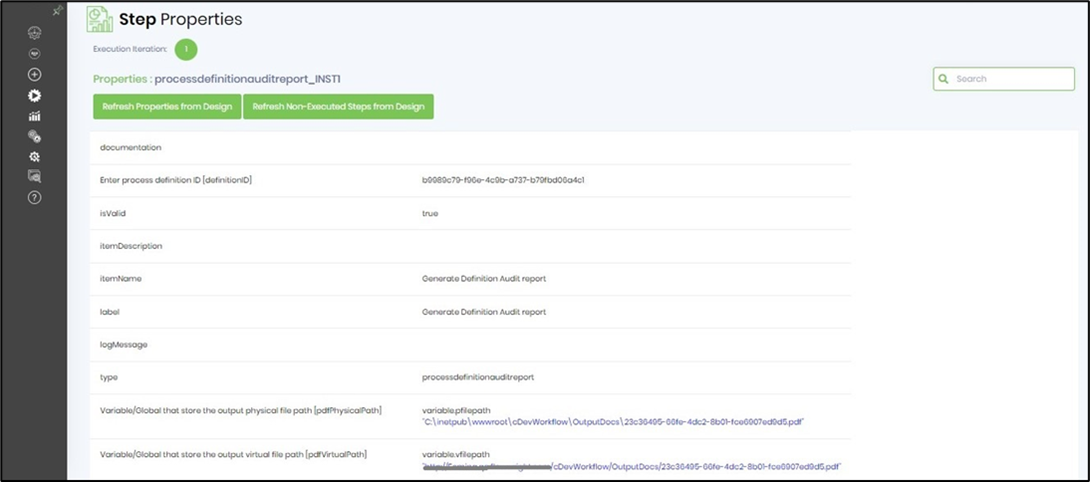
- Save the process definition, create a process instance, and execute it. The Step should generate a process definition audit report for the selected definition ID. Render the process instance and verify the Step's properties.
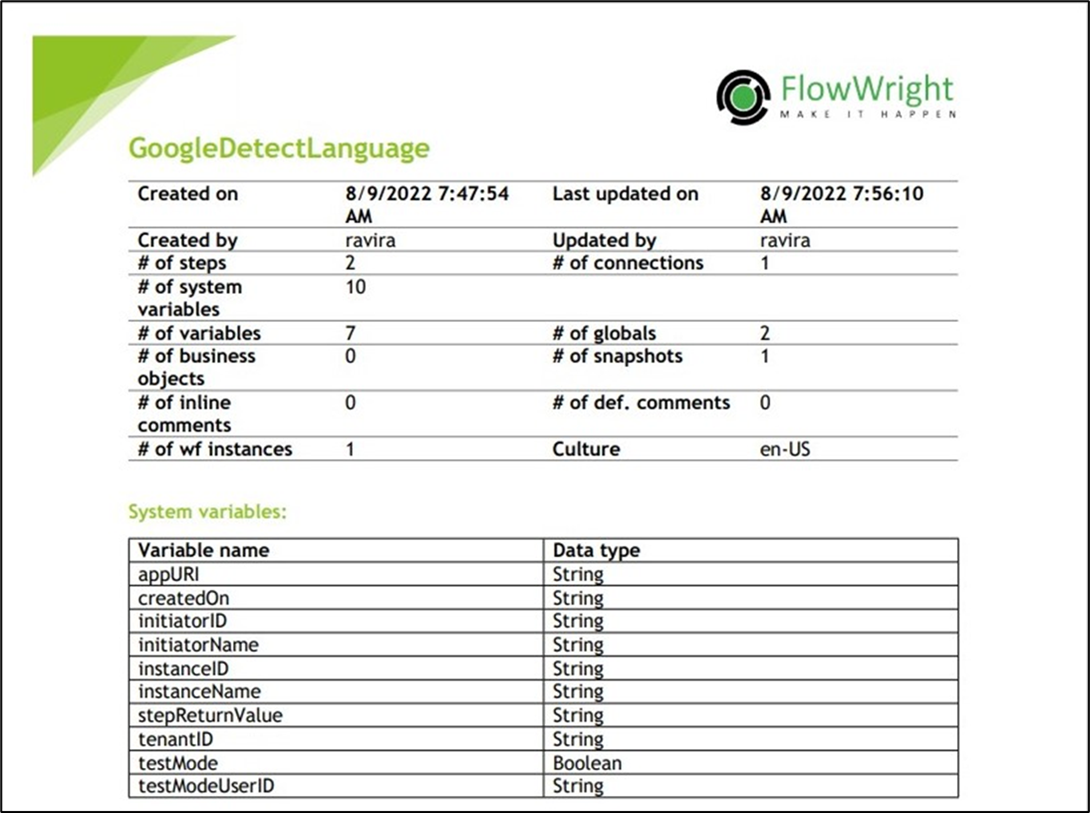
- Use the “variable.virtualfilepath” to download the PDF audit report and the content sample shown below.
Tips:
- Generate audit reports whenever workflow definitions are published or significantly modified.
- Store both physical and virtual report paths in reusable workflow variables for downstream activities.
- Archive generated reports to maintain historical documentation of workflow definitions.
- Use the virtual report path when distributing reports through email notifications or workflow portals.
- Route the False path to logging and notification steps for easier troubleshooting.
- Combine this step with Generate Process Instance Audit Report, Send Email, Get Virtual URL for a File, Archive Process Instance, ZipFile, or document management steps to build comprehensive governance and compliance workflows.
Notes:
- All three configuration properties are required.
- The step generates a PDF audit report for the specified process definition.
- Both the physical and virtual file paths are stored in the configured workflow or global variables.
- The workflow definition itself is not modified.
- Both the True and False return paths should be implemented to provide complete workflow handling.
- Ensure that the FlowWright application has sufficient permissions to generate and store PDF reports.
- Report generation details are recorded in the FlowWright workflow execution log.
Generate Process Definition Audit Report vs. Generate Process Instance Audit Report:
Although both steps generate PDF audit reports, they target different workflow entities.
| Generate Process Definition Audit Report | Generate Process Instance Audit Report |
|---|---|
| Generates an audit report for a workflow definition. | Generates an audit report for a workflow execution (process instance). |
| Requires a Process Definition ID. | Requires a Process Instance ID. |
| Documents the workflow design and definition. | Documents the execution history of a workflow instance. |
| Used for governance, design reviews, documentation, and compliance. | Used for operational auditing, execution analysis, troubleshooting, and compliance evidence. |
| Stores both the generated physical and virtual report paths. | Stores both the generated physical and virtual report paths. |
As a general guideline:
- Use the Generate Process Definition Audit Report when documenting or auditing a workflow design for governance, compliance, quality assurance, or change management.
- Use Generate Process Instance Audit Report when documenting the execution history of a specific workflow instance for operational reviews, troubleshooting, customer reporting, or regulatory evidence.
Definition Sample:
You may download the sample workflow definition from the link provided and import it into your FlowWright environment.
Note: Verify and complete any missing configuration after importing the sample, including:
- Process definition identifier
- Physical report path variable or global variable
- Virtual report path variable or global variable
- Success and failure workflow branches
- Appropriate permissions for PDF generation and file storage
After verifying the configuration, save and publish the workflow before execution.